Wednesday, 13 April 2016

6 Reason to Adapt as a Career in Digital Marketing


If you afraid to adapt career in Digital Marketing and think that its so hard to do then read below point.

Digital Marketing is quite technical so people might think not to adapt it but they do not understand that whether they run away from it, in this today's era anywhere they are using this if you have bought something online and you know heard about that content is king or keyword stuffing, website earning details and download snap chat on to your mobile, knowledge about SEO, using Google. Among them, if you have knowledge any three of them then you have the experienced about Digital Marketing.

Buying Online

Digital Marketing all concept depend on people buying online, the marketing funnel and the moment of conversion. If you have ever purchased something online you have already experienced about Digital Marketing.

Content is King

Content is king now every day you can see new topic on internet and user want to get information about more on topic. If on web content has quality then get the more visitors. Digital Marketing is all depend on content if your content has fresh and quality and has the potential to get the visitor then your digital marketing efforts worth.

Keyword Stuffing

If you know about keyword stuffing - Exp get iphone, get iphone, get iphone then you have experienced the Digital Marketing. Its past concept but still if keyword stuffing are in your content then Google will mark spam to your website.

Snap Chat

If you use Snap Chat on your phone then you have experienced about the Digital Marketing. Snap Chat is well fast growing social network you can send images and video to edit with funny images. Here you can send images and video that can disappear after 10 second.

Google

If you use Google for your search then you can solve 90% percent of your query and experiencing about digital marketing Google follow the concept of Digital Marketing.

SEO


If you have the knowledge about Search Engine Marketing then you have experienced about Digital Marketing as big concept of Digital Marketing is depending on Seo. 

Saturday, 2 April 2016

How Knowledge Graph is the Problem for SEO ?


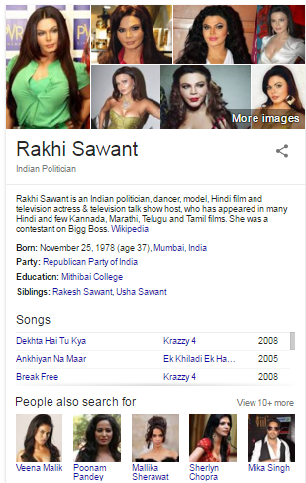
Now a days this topic is very popular KGO - Knowledge Graph Optimization. How to Do it? Let's Say if you find information about Sachin Tendulkar Google reach the query related to Sachin Tendulkar in its database and show a panel on the right side of the SERP with images and important information about him.

We are thinking always this question where is this information coming from? The information we get is a mixture between information that other user found useful and informative post on knowledge graph. If there is a problem, then we have the option of feedback button, submit the problem and information will be modified correctly On Google and Wikipedia.


'
What is the Impact of Knowledge Graph on SEO ?


As we know Knowledge Graph is based on information data. From this Webmasters have trouble in terms of ranking and traffic as well.


Let's take example the search query entered Rakhi Sawant on right hand side all the information about Rakhi sawant is there so user would go through to this information rather then click on Rakhi Sawant officially website. We can also see the search query competitor here you can see in the result showing Poonam Pandey and Mallika Sherawat..

Thursday, 17 March 2016

Are You Fed Up from Redirecting Your Blog to Country specific URLS ?

Google now redirects Blogger blogs to country-specific domains. For instance, if you open example.blogspot.com in your web browser, you will be redirected to example.blogspot.in if you are located in India or to example.blogspot.co.uk if you are accessing the blog from UK.


Google does country-specific redirection for selective censorship – that means they can easily censor or block a blog post, or other entire blog site, in one country but still serve that page in other geographic regions. Blog redirection only occurs if you are on a blogspot domain and not if your Blogger blog is on a custom domain.


My traffic logs suggest that country-specific redirection in Blogger is live in at least 15 countries. They are India [blogspot.in], Australia [blogspot.com.au], UK [blogspot.co.uk], Japan [blogspot.jp], New Zealand [blogspot.co.nz], Canada [blogspot.ca], Germany [blogspot.de], Italy [blogspot.it], France [blogspot.fr], Sweden [blogspot.se], Spain [blogspot.com.es], Portugal [blogspot.pt], Brazil [blogspot.com.br], Argentina [blogspot.com.ar], Mexico [blogspot.mx]

Prevent Blogger from Redirecting to Country-Specific Domains


This country based URL redirection is likely to impact your Blogger blogs in a not so positive manner. For example:

The social stats – like your Facebook Likes, Google +1s and Tweet counts – for your blog posts may be reduced as the URLs for the same blog post will be different for different visitors.
You will have a similar problem if you are using an external commenting platform like Disqus or Facebook Comments because the blog URLs will be different even when the underlying page is the same.
Also, if canonicalization isn’t implemented properly, it may cost you some Google juice as external websites may link to your country-specific pages.
Some users have reported a dip in Google AdSense earnings when pages are served through country-specific domains.
If you are not happy with the idea of Blogger redirecting your blog to a different URL, you can add the following piece of code to your Blogger template and it will always serve the .com address to your visitors irrespective of their geographic location.

Go to your blog inside the Blogger Dashboard and choose Template. Then click the “Edit HTML” button followed by “Proceed.” Next, copy-paste the following code into the template after the <head> tag.

<script type="text/javascript">

  // Written by R.P.Singh
  
  /* Get the full URL of the current blogger page */
  var blog = document.location.href.toLowerCase();

  /* Do not redirect if the domain is .com already */
  if (!blog.match(/\.blogspot\.com/)) {

    /* Replace the country TLD with .com and ncr switch */
    blog = blog.replace(/\.blogspot\..*?\//, ".blogspot.com/ncr/");

    /* Redirect to the new .com URL in the current tab */
    window.location.replace(blog);
  }

  // Source: http://labnol.org/?p=21031
  
</script>
Click the Save Template button and now your Blogger Blog will always serve with the blogspot.com URL.

The JavaScript snippet gets the URL of the current Blogger page and if it isn’t served from the .com domain, the code replaces the country specific TLD (like blogspot.co.au or blogspot.pk) with the blogspot.com URL. It also adds the /ncr switch to force-redirect the visitor to the blogspot.com address.


Source: http://www.labnol.org/internet/prevent-blogger-country-redirection/21031/

Thursday, 11 February 2016

Open Graph Protocol Meta Tags

Open Graph Meta Tags

For Facebook and other social media account open graph feature is very important. To using this property tag you can give best look to your post. You can change the post image, title, description accordingly what you want. Showing unique post and showing it differently from other competitor you can improve the website traffic. Visitor will attract to this and can click your post. Here you have different types of open graph meta tags like title tag, description tag, image tag .


Open Graph Protocol Meta Tags


Here you can see these tag has been put under the head tag and there are different type of tags you can see here.

Thursday, 4 February 2016

How to Add Google Analytics

From Analytic Tool  you can get the knowledge of you website visitor from that you can improve traffic and your website page traffic. From Google analytic you can get the information about organic, paid, visitor after that you can separate the information and can analyse your website and take appropriate action for improve your site performance. Below you can see step by step Google analytic code implementation form this you can get know the estimated unique monthly traffic


Apply Analytic Code
Add caption


Login to Google analytic account go to admin and click tracking Info - than get the script and copy that.


After copy code from Google analytic tool than go to website source paste code above </head> close header tag.


Wednesday, 3 February 2016

How to Create a Robots.txt File ?


How to apply or put its code?


The best and short answer is put it into top-level directory of your web server.


When a robot looks for the "/robots.txt" file for URL, it strips the path component from the URL (everything from the first single slash), and puts "/robots.txt" in its place.

For example, for "http://www.example.com/shop/index.html, it will remove the "/shop/index.html", and replace it with "/robots.txt", and will end up with "http://www.example.com/robots.txt".


See also:

What program should I use to create /robots.txt?
How do I use /robots.txt on a virtual host?
How do I use /robots.txt on a shared host?
What to put in it

The "/robots.txt" file is a text file, with one or more records. Usually contains a single record looking like this:
User-agent: *
Disallow: /cgi-bin/
Disallow: /tmp/
Disallow: /~joe/
In this example, three directories are excluded.


Note: When you create this you need to sepaate "Disallow" line for every URL prifix you want to exclude -- Here you can't "Disallow: /cgi-bin/ /tmp/" on a single line.


Note also that globbing and regular expression are not supported in either the User-agent or Disallow lines. The '*' in the User-agent field is a special value meaning "any robot". Specifically, you cannot have lines like "User-agent: *bot*", "Disallow: /tmp/*" or "Disallow: *.gif".

What you want to exclude depends on your server. Everything not explicitly disallowed is considered fair game to retrieve. Here follow some examples:

To exclude all robots from the entire server

User-agent: *
Disallow: /

To allow all robots complete access

User-agent: *
Disallow:
(or just create an empty "/robots.txt" file, or don't use one at all)

To exclude all robots from part of the server

User-agent: *
Disallow: /cgi-bin/
Disallow: /tmp/
Disallow: /junk/
To exclude a single robot

User-agent: BadBot
Disallow: /
To allow a single robot

User-agent: Google
Disallow:

User-agent: *
Disallow: /
To exclude all files except one

This is currently a bit awkward, as there is no "Allow" field. The easy way is to put all files to be disallowed into a separate directory, say "stuff", and leave the one file in the level above this directory:
User-agent: *
Disallow: /~joe/stuff/

Alternatively you can explicitly disallow all disallowed pages:
User-agent: *
Disallow: /~joe/junk.html
Disallow: /~joe/foo.html
Disallow: /~joe/bar.html

Friday, 29 January 2016

Heath & Fitness Directory Website List

Get the

Health

& Fitness directory website and get the relevant link. Now you can get best back link to use these website and can improve your website ranking.


1  ADA Pool Lift Installers Directory

2 Health Directory Online

3Dental Direct

4Dance Directory

5Jax Medical Directory

6Mike Andrews

7Be Visible on Health Web Directories

8Be Visible on Health Directories

9Be Visible on Health Directories

10Healthlinedirectory

11Get Links from Indexed Health Web Directories

12Get Links from Cached Health Directories

13Get Featured on Health Web Directories

14Gain Visibility on Health Directories

15Free List of Useful Health Sites

16Free Advertising for Health Resources

17Directory of Quality Health Sites

18Collection of Top Quality Health Sites

19Collection of Quality Online Health Resources

20Categorized List of Health Websites

21Benefit from Submitting to Health Directories

22Benefit from Quality One-Way Health Links

23Benefit from Links in Health Directories

24Be Visible on Health Web Directories

25Niche Health Links Directory

26Health Info Junction - Niche Health Directory

27Directory of Great Health Sites

28SEO Friendly Health Directory

29Hand-Picked Health Links

30Healing Links - Free Health Directory

31Ares Health

32Jack Cole - Niche Health Links Directory

33Delaine Isaac - Niche Health Directory

34Directory of Great Health Sites

35Diego Bernard - SEO Friendly Health Directory

36Infima - Hand-Picked Health Links

37Tranquil Wellness - Free Health Directory

38Health Care Directory


39Health and Medical Listings

40Live Health Search

41Healthdoom

42Medicine EDU Backlinks

43Accident.EDU

44Eternity of Spirit Directory

45Chiro Insight

46Health and Beauty Listings

47Health Directory

48All Health Niche Directory

49Natural Health Directory

50Health and Fitness Directory

51Free Medical Directory

52Free Health Directory

53Medical Science

54AbiLogic Beauty & Spa Directory

55UK Medical Websites

56Dermatology Doctors


57Fertility Treatment

58Health & Medical Directory

59Rad Kid

60TamilNadu MedicallToursim directory

61Maxx Herbal Directory

62Medcal Market Directory

63Greater Dentistry Directory

64CallMedic.com Directory of Medical Resources

65Health Fitness Directory

66Health Directory

67Psychology resources

68Health Directory

69iamnatural.com.au

70
Softz Health Directory

71
Portal 4 Health

72Health Directory.org

73Health Resource Directory

74Index Healthy

75Healthy Directory

76Health Directory

77Healthweb

78Health & Beauty Directory

79Alternative health directory

80Nafwa

81
Net Health Directory

82Heal3

83Directory Med

84ABC.MD | Medical Directory

85Pregnancy Directory

86U9X.net

87Dr Query

88PsychLinks Mental Health Directory

89Medical Directory Online

90Health Directory Diet Links

91Highlight Health

92World Health HQ

93eMediNews Health Directory

Wednesday, 27 January 2016

Priority Wise Search Engine List

Get High priority wise search engine. These are the world's biggest search engine


Google 1 | Google
  Estimated Unique Monthly Visitors | 1 - Compete Rank | 1 - Quantcast Rank | 1 - Alexa Rank |
The Most Popular Search Engines | 

Bing 2 | Bing
  Estimated Unique Monthly Visitors | 5 - Compete Rank | 19 - Quantcast Rank | 22 - Alexa Rank |
The Most Popular Search Engines | 

Yahoo! 3 | Yahoo! Search
  Estimated Unique Monthly Visitors | *8* - Compete Rank | *28* - Quantcast Rank | NA - Alexa Rank |
The Most Popular Search Engines | 

Ask 4 | Ask
 BizMBA Rank | 245,000,000 - Estimated Unique Monthly Visitors | 14 - Compete Rank | 31 - Quantcast Rank | 31 - Alexa Rank | Last Updated: January 12, 2016.
The Most Popular Search Engines | 

Aol Search 5 | Aol Search
 Estimated Unique Monthly Visitors | *250* - Compete Rank | *240* - Quantcast Rank | NA - Alexa Rank |
The Most Popular Search Engines | 

Wow 6 | Wow
271 -   - Estimated Unique Monthly Visitors | 20 - Compete Rank | *26* - Quantcast Rank | 767 - Alexa Rank |
The Most Popular Search Engines | 

Web Crawler 7 | WebCrawler
 Estimated Unique Monthly Visitors | 100 - Compete Rank | 759 - Quantcast Rank | 674 - Alexa Rank | Last Updated: January 12, 2016.
The Most Popular Search Engines | 

My Web Search 8 | MyWebSearch
  Estimated Unique Monthly Visitors | *105* - Compete Rank | 1,124 - Quantcast Rank | 405 - Alexa Rank | Last Updated: January 12, 2016.
The Most Popular Search Engines |

Infospace 9 | Infospace
892 -  Estimated Unique Monthly Visitors | *66* - Compete Rank | *500* - Quantcast Rank | 2,110 - Alexa Rank | Last Updated: January 12, 2016.
The Most Popular Search Engines | 

Info 10 | Info
 Estimated Unique Monthly Visitors | 378 - Compete Rank | 877 - Quantcast Rank | 1,938 - Alexa Rank | Last Updated: January 12, 2016.
The Most Popular Search Engines |

Duck Duck Go 11 | DuckDuckGo
 Estimated Unique Monthly Visitors | 1,898 - Compete Rank | 2,290 - Quantcast Rank | 629 - Alexa Rank | Last Updated: January 12, 2016.
The Most Popular Search Engines | 

Contentko 12 | Contenko
 Estimated Unique Monthly Visitors | *200* - Compete Rank | *2,500* - Quantcast Rank | 4,505 - Alexa Rank | Last Updated: January 12, 2016.
The Most Popular Search Engines | 

Dogpile 13 | Dogpile
 Estimated Unique Monthly Visitors | 2,734 - Compete Rank | 1,446 - Quantcast Rank | 3,084 - Alexa Rank | Last Updated: January 12, 2016.
The Most Popular Search Engines | 

Alhea 14 | Alhea
 Estimated Unique Monthly Visitors | 451 - Compete Rank | *1,225* - Quantcast Rank | 11,225 - Alexa Rank | Last Updated: January 12, 2016.
The Most Popular Search Engines | 
ixquick 15 | ixQuick
Estimated Unique Monthly Visitors | 12,512 - Compete Rank | 4,468 - Quantcast Rank | 9,857 - Alexa Rank | Last Updated: January 12, 2016.
The Most Popular Search Engines |